
FATallyConnector SOP (Important Configuration)
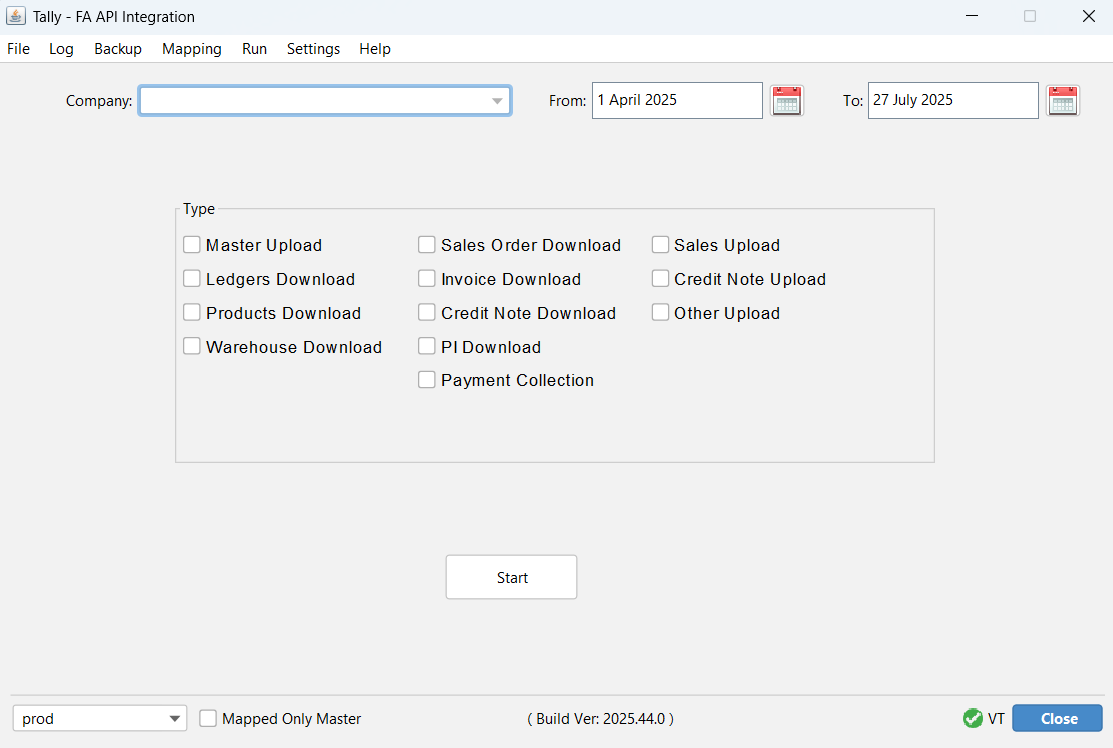
This document outlines essential guidelines, requirements, and limitations for integrating the FieldAssist DMS with Tally. Please review these points carefully to ensure a smooth and accurate data synchronization process.
-
TallyConnector Button Uses:
- Setting: Change the Tally port if both Tally and the software use the same port to enable proper linkage with Tally.
- Token: Use this to check DMS connectivity. After logging into DMS, go to Profile → Connect Tally, then check the token in the software to verify DMS-to-TallyConnector connectivity.
- Log: View ongoing process activity logs to help debug user issues.
- Create Backup: Creates a backup of the selected Tally company. It is best practice to take a backup every time before importing data.
- Backup Location: Allows you to set the desired Tally backup location.
- Mapping Download Excel: Generates a master mapping Excel file.
- Upload Excel: After successful mapping, this can be uploaded to both DMS and Tally.
- Update Ledger Details: Forcefully updates ledger details such as GSTIN and address in Tally.
- Update Item Details: Forcefully updates product details such as HSN code and tax rate in Tally.
- Round Off: Enables invoice import with round-off ledgers.
- Prefix GST Ledger: Allows you to modify GST ledger naming to use INPUT and OUTPUT GST.
- Company: Select the Tally company name into which you want to import data.
- From & To Date: Specify the date range to import data from DMS.
- Sales Order Download: Downloads DMS sales orders into Tally.
- Invoice Download: Downloads DMS sales invoices into Tally as sales vouchers.
- Credit Note Download: Downloads only approved credit notes as customer sales returns in Tally.
- PI Download: Downloads GRNs from DMS into Tally as purchase vouchers.
- Payment Collection: Downloads payment collections as receipt vouchers in Tally.
-
Software Location Requirements
Tally software and TallyConnector must be installed on the same local system, or if hosted on the cloud, they must be on the same cloud server. To link with the DMS, Chrome browser access is required to log in to the DMS application
-
Voucher Type Settings
The integration supports only the following default Tally voucher types:
- Sales
- Purchase
- Receipt
- Credit Note
- Sales Order
Note: If any manual entries already exist under the default Tally voucher types, we will create new voucher types using the standard names listed above. The existing user-modified voucher types (e.g., 'Sales Old', 'Sale Other Brand', etc.) will be renamed to avoid conflicts. This ensures that all manual entries are recorded under separate voucher types, not under the default types used by DMS.Mandatory Voucher Type Settings in Tally (to avoid duplicate entries and ensure the same invoice number as in DMS):- Method of Voucher Numbering: Must be set to Automatic (Manual Override).
- Prevent Creating Duplicate Voucher Nos: Must be set to Yes. This is critical to prevent data syncing errors and accounting discrepancies.
-
Ledger & Stock Item Mapping
Proper mapping is mandatory if existing ledgers and stock items in Tally are to be retained.
Without mapping, the system will automatically create new ledgers and items, which may lead to:
- Ledger balance mismatches.
- Duplication or mismatches of stock items.
-
Ledger & Stock Item Categorization
The connector does not support the auto-categorization of ledgers and stock items.
All categorization (e.g., placing items or ledgers under specific groups) must be done manually within Tally after the data has been imported.
Placing stock items into their respective Tally groups is not possible because the Tally group names are not available on the DMS side
-
GST Details at Master Level
- At the stock item level, only the HSN code and Tax Rate are fetched from the DMS. Other item-specific master details (e.g., MRP) are not included.
- At the ledger master level, only the Party Name, Address, and GSTIN are imported.
If any party GSTIN or address details are updated in DMS, the master data must be re-synced to reflect the changes in Tally
Similarly, if any stock item's HSN code or tax rate is updated in DMS, it must be re-synced in Tally as well
-
Discount Handling (TDL Customization)
The Discount ledger must have the following configuration:
- Group: Indirect Expenses
- Type of Ledger: Not Applicable
- Is GST Applicable: Applicable
Tally does not natively support multi-level discounts. Some distributors may use Tally Definition Language (TDL) customizations that are not compatible with our connector.
To ensure compatibility, our integration handles discounts as follows:
- Primary, Secondary, and Total Discounts are posted to common ledgers (e.g.,
"Total Discount","Total Primary Discount"). - Item-level discounts are shown in the item description field within the invoice.
-
Cancelled Records
- Cancelled records in the DMS will not be imported into Tally.
- If a sales invoice has already been synced with Tally and is later cancelled in the DMS, the client must re-sync the data for the same date range to reflect the cancellation in Tally.
-
Updates After Sync
If an invoice is updated in the DMS (e.g., changes in items or amounts) after it has been synced, the client must re-sync the updated data to reflect these changes in Tally.
-
Tally Add-on Features
- Custom Tally add-ons used by the client will not function through the integration.
- Due to technical limitations, features from such add-ons cannot be replicated by the connector.
-
Invoice Rounding (Round-Off Handling)
DMSandSAPare not pure accounting platforms and may permit rounding discrepancies that Tally does not. Tally requires precise debit-credit matching, where even a difference of ₹0.0001 can cause an entry to fail.Our connector includes logic to manage rounding differences up to ₹1.
This round-off patch may not cover all scenarios, particularly if invoice totals differ significantly. We are continuously refining this logic for better accuracy.
-
E-Invoicing Support
- E-invoice fields (e.g., IRN, Ack No.) are not included in the current scope of the integration.
- Support for e-invoicing will be considered in a future update.
-
Standard Process for Credit Notes and Sales
The correct practice is to first create the Sales voucher and then the corresponding Credit Note, as they are linked via a reference number.
Please follow this standard sequence when importing data. Failure to do so may result in entries being incorrectly linked or posted under the wrong voucher types.
-
Tally Default Settings
If any default settings in Tally have been modified by the distributor, these changes must be shared with us before the integration begins. This includes changes to:
- Default godown name (e.g., changing 'Main Location' to something else).
- Default voucher type names.
- Default ledger groups.
- Any other default configurations.
Providing this information is crucial for ensuring smooth and accurate data syncing.
Software Update Logs
Latest Version: FaTallyConnects2025.44.jar
Update Highlights:
Credit Note Date Enhancement: This update includes a critical fix for credit note date handling. Previously, the credit note date was set to the creation date, but as per DMS requirements, it's only valid when approved. The system now considers the approved date as the credit note date for accurate synchronization.